










Bakta: rapid & standardized annotation of bacterial genomes, MAGs & plasmids
Welcome to the documentation of Bakta !
Bakta is a tool for the rapid & standardized annotation of bacterial genomes and plasmids from both isolates and MAGs. It provides dbxref-rich, sORF-including and taxon-independent annotations in machine-readable JSON & bioinformatics standard file formats for automated downstream analysis.
Outline
This documentation contains three major sections:
- Bakta CLI: This contains the documentation how to use Bakta from the Command Line.
- Bakta Web: A quick guide for our free to use web annotation and visualization service at https://bakta.computational.bio
- Bakta API: Documentation and examples how to use the API that powers the web service
Features
-
Comprehensive & taxonomy-independent database Bakta provides a large and taxonomy-independent database using UniProt's entire UniRef protein sequence cluster universe. Thus, it achieves favourable annotations in terms of sensitivity and specificity along the broad continuum ranging from well-studied species to unknown genomes from MAGs.
-
Protein sequence identification Bakta exactly identifies known identical protein sequences (IPS) from RefSeq and UniProt allowing the fine-grained annotation of gene alleles (
AMR) or closely related but distinct protein families. This is achieved via an alignment-free sequence identification (AFSI) approach using full-lengthMD5protein sequence hash digests. -
Fast This AFSI approach substantially accellerates the annotation process by avoiding computationally expensive homology searches for identified genes. Thus, Bakta can annotate a typical bacterial genome in 10 ±5 min on a laptop, plasmids in a couple of seconds/minutes.
-
Database cross-references Fostering the FAIR principles, Bakta exploits its AFSI approach to annotate CDS with database cross-references (dbxref) to RefSeq (
WP_*), UniRef100 (UniRef100_*) and UniParc (UPI*). By doing so, IPS allow the surveillance of distinct gene alleles and streamlining comparative analysis as well as posterior (external) annotations ofputative&hypotheticalprotein sequences which can be mapped back to existing CDS via these exact & stable identifiers (E. coli gene ymiA ...more). Currently, Bakta identifies ~214.8 mio, ~199 mio and ~161 mio distinct protein sequences from UniParc, UniRef100 and RefSeq, respectively. Hence, for certain genomes, up to 99 % of all CDS can be identified this way, skipping computationally expensive sequence alignments. -
FAIR annotations To provide standardized annotations adhearing to FAIR principles, Bakta utilizes a versioned custom annotation database comprising UniProt's UniRef100 & UniRef90 protein clusters (FAIR -> DOI/DOI) enriched with dbxrefs (
GO,COG,EC) and annotated by specialized niche databases. For each DB version we provide a comprehensive log file of all imported sequences and annotations. -
Small proteins / short open reading frames Bakta detects and annotates small proteins/short open reading frames (sORF) which are not predicted by tools like
Prodigal. -
Expert annotation systems To provide high quality annotations for certain proteins of higher interest, e.g. AMR & VF genes, Bakta includes & merges different expert annotation systems. Currently, Bakta uses NCBI's AMRFinderPlus for AMR gene annotations as well as an generalized protein sequence expert system with distinct coverage, identity and priority values for each sequence, currenlty comprising the VFDB as well as NCBI's BlastRules.
-
Comprehensive workflow Bakta annotates ncRNA cis-regulatory regions, oriC/oriV/oriT and assembly gaps as well as standard feature types: tRNA, tmRNA, rRNA, ncRNA genes, CRISPR, CDS and pseudogenes.
-
GFF3 & INSDC conform annotations Bakta writes GFF3 and INSDC-compliant (Genbank & EMBL) annotation files ready for submission (checked via GenomeTools GFF3Validator, table2asn_GFF and ENA Webin-CLI for GFF3 and EMBL file formats, respectively for representative genomes of all ESKAPE species).
-
Bacteria & plasmids only Bakta was designed to annotate bacteria (isolates & MAGs) and plasmids, only. This decision by design has been made in order to tweak the annotation process regarding tools, preferences & databases and to streamline further development & maintenance of the software.
-
Reasoning By annotating bacterial genomes in a standardized, taxonomy-independent, high-throughput and local manner, Bakta aims at a well-balanced tradeoff between fully featured but computationally demanding pipelines like PGAP and rapid highly customizable offline tools like Prokka. Indeed, Bakta is heavily inspired by Prokka (kudos to Torsten Seemann) and many command line options are compatible for the sake of interoperability and user convenience. Hence, if Bakta does not fit your needs, please consider trying Prokka.
License
Bakta and all of its components are licensed under the GPL-3.0 license.
Bakta Command Line
This chapter describes the usage of the main Bakta command line tool (CLI). It is derived from the official README.md on GitHub.
The following sections describe the overall usage of the Bakta CLI:
- Installation - How to install Bakta
- Examples - Basic usage examples
- Input and Output - Information about input and output files
- Usage - Command Line Options
- Annotation Workflow - Technical details about the annotation workflow
- Database - How to prepare and use the mandatory database
- Genome Submission - How to submit genomes to common repositories
- Protein bulk annotation - Bulk annotation of proteins
- Genome plots - Configuration options for creating genome plots
- Auxillary scripts - Additional helper scripts that might be useful
- Citation - How to cite the tool in your own work
- FAQ - A few frequently askes questions
Installation
Bakta can be installed via BioConda, Docker, Singularity and Pip. However, we encourage to use Conda or Docker/Singularity to automatically install all required 3rd party dependencies.
In all cases a mandatory database must be downloaded.
BioConda
conda install -c conda-forge -c bioconda bakta
Podman (Docker)
We maintain a Docker image oschwengers/bakta providing an entrypoint, so that containers can be used like an executable:
podman pull oschwengers/bakta
podman run oschwengers/bakta --help
Installation instructions and get-started guides: Podman docs. For further convenience, we provide a shell script (bakta-podman.sh) handling Podman related parameters (volume mounting, user IDs, etc):
bakta-podman.sh --db <db-path> --output <output-path> <input>
For experienced users and full functionality (bakta_db & bakta_proteins), an image without entrypoint might be a better option. For these cases, please use one of the Biocontainer images:
export CONTAINER="quay.io/biocontainers/bakta:1.8.2--pyhdfd78af_0"
podman run -it --rm $CONTAINER bakta --help
podman run -it --rm $CONTAINER bakta_db --help
Pip
python3 -m pip install --user bakta
Bakta requires the following 3rd party software tools which must be installed and executable to use the full set of features:
- tRNAscan-SE (2.0.11) https://doi.org/10.1101/614032 http://lowelab.ucsc.edu/tRNAscan-SE
- Aragorn (1.2.41) http://dx.doi.org/10.1093/nar/gkh152 http://130.235.244.92/ARAGORN
- INFERNAL (1.1.4) https://dx.doi.org/10.1093%2Fbioinformatics%2Fbtt509 http://eddylab.org/infernal
- PILER-CR (1.06) https://doi.org/10.1186/1471-2105-8-18 http://www.drive5.com/pilercr
- Pyrodigal (3.5.0) https://doi.org/10.21105/joss.04296 https://github.com/althonos/pyrodigal
- PyHMMER (0.10.15) https://doi.org/10.21105/joss.04296 https://github.com/althonos/pyhmmer
- Diamond (2.1.10) https://doi.org/10.1038/nmeth.3176 https://github.com/bbuchfink/diamond
- Blast+ (2.14.0) https://www.ncbi.nlm.nih.gov/pubmed/2231712 https://blast.ncbi.nlm.nih.gov
- AMRFinderPlus (4.0.3) https://github.com/ncbi/amr
- pyCirclize (1.7.0) https://github.com/moshi4/pyCirclize
Database download
Bakta requires a mandatory database which is publicly hosted at Zenodo:
We provide 2 types: full and light. To get best annotation results and to use all features, we recommend using the full (default). If you seek for maximum runtime performance or if download time/storage requirements are an issue, please try the light version. Further information is provided in the database section below.
List available DB versions (available as either full or light):
bakta_db list
...
To download the most recent compatible database version we recommend to use the internal database download & setup tool:
bakta_db download --output <output-path> --type [light|full]
Of course, the database can also be downloaded manually:
wget https://zenodo.org/record/10522951/files/db-light.tar.gz
tar -xzf db-light.tar.gz
rm db-light.tar.gz
If required, or desired, the AMRFinderPlus DB can also be updated manually:
amrfinder_update --force_update --database db-light/amrfinderplus-db/
If you're using bakta on Docker:
docker run -v /path/to/desired-db-path:/db --entrypoint /bin/bash oschwengers/bakta:latest -c "bakta_db download --output /db --type [light|full]"
As an additional data repository backup, we provide the most recent database version via our institute servers: full, light. However, the bandwith is limited. Hence, please use it with caution and only if Zenodo might be temporarily uncreachable or slow. In these cases, please also download the AMRFinderPlus database as indicated above.
Update an existing database:
bakta_db update --db <existing-db-path> [--tmp-dir <tmp-directory>]
Update using Docker:
docker run -v /path/to/desired-db-path:/db --entrypoint /bin/bash oschwengers/bakta:latest -c "bakta_db update --db /db/db-[light|full]"
The database path can be provided either via parameter (--db) or environment variable (BAKTA_DB):
bakta --db <db-path> genome.fasta

export BAKTA_DB=<db-path>
bakta genome.fasta
For system-wide setups, the database can also be copied to the Bakta base directory:
cp -r db/ <bakta-installation-dir>
As Bakta takes advantage of AMRFinderPlus for the annotation of AMR genes, AMRFinder is required to setup its own internal databases in a <amrfinderplus-db> subfolder within the Bakta database <db-path>, once via amrfinder_update --force_update --database <db-path>/amrfinderplus-db/. To ease this process we recommend to use Bakta's internal download procedure.
Examples
Simple:
bakta --db <db-path> genome.fasta
Expert: verbose output writing results to results directory with ecoli123 file prefix and eco634 locus tag using an existing prodigal training file, using additional replicon information and 8 threads:
bakta --db <db-path> --verbose --output results/ --prefix ecoli123 --locus-tag eco634 --prodigal-tf eco.tf --replicons replicon.tsv --threads 8 genome.fasta
Input and Output
Input
Bakta accepts bacterial genomes and plasmids (complete / draft assemblies) in (zipped) fasta format. For a full description of how further genome information can be provided and workflow customizations can be set, please have a look at the Usage section or this manual.
Replicon meta data table
To fine-tune the very details of each sequence in the input fasta file, Bakta accepts a replicon meta data table provided in csv or tsv file format: --replicons <file.tsv>. Thus, complete replicons within partially completed draft assemblies can be marked & handled as such, e.g. detection & annotation of features spanning sequence edges.
Table format:
| original sequence id | new sequence id | type | topology | name |
|---|---|---|---|---|
old id | new id, <empty> | chromosome, plasmid, contig, <empty> | circular, linear, <empty> | name, <empty> |
For each input sequence recognized via the original locus id a new locus id, the replicon type and the topology as well a name can be explicitly set.
Shortcuts:
chromosome:cplasmid:pcircular:clinear:l
<empty> values (- / ``) will be replaced by defaults. If new locus id is empty, a new contig name will be autogenerated.
Defaults:
- type:
contig - topology:
linear
Example:
| original locus id | new locus id | type | topology | name |
|---|---|---|---|---|
| NODE_1 | chrom | chromosome | circular | - |
| NODE_2 | p1 | plasmid | c | pXYZ1 |
| NODE_3 | p2 | p | c | pXYZ2 |
| NODE_4 | special-contig-name-xyz | - | - | - |
| NODE_5 | `` | - | - | - |
User-provided regions
Bakta accepts pre-annotated (a priori), user-provided feature regions via --regions in either GFF3 or GenBank format. These regions supersede all de novo-predicted regions, but are equally subject to the internal functional annotation process. Currently, only CDS are supported. A maximum overlap with de novo-predicted CDS of 30 bp is allowed. If you would like to provide custom functional annotations, you can provide these via --proteins which is described in the following section.
User-provided protein sequences
Bakta accepts user-provided trusted protein sequences via --proteins in either GenBank (CDS features) or Fasta format which are used in the functional annotation process. Using the Fasta format, each reference sequence can be provided in a short or long format:
# short:
>id gene~~~product~~~dbxrefs
MAQ...

# long:
>id min_identity~~~min_query_cov~~~min_subject_cov~~~gene~~~product~~~dbxrefs
MAQ...
Allowed values:
| field | value(s) | example |
|---|---|---|
| min_identity | int, float | 80, 90.3 |
| min_query_cov | int, float | 80, 90.3 |
| min_subject_cov | int, float | 80, 90.3 |
| gene | <empty>, string | msp |
| product | string | my special protein |
| dbxrefs | <empty>, db:id, , separated list | VFDB:VF0511 |
Protein sequences provided in short Fasta or GenBank format are searched with default thresholds of 90%, 80% and 80% for minimal identity, query and subject coverage, respectively.
User-provided HMMs
Bakta accepts user-provided trusted HMMs via --hmms in HMMER's text format. If set, Bakta will adhere to the trusted cutoff specified in the HMM header. In addition, a max. evalue threshold of 1e-6 is applied. By default, Bakta uses the HMM description line as a product description. Further information can be provided via the HMM description line using the short format as explained above in the User-provided protein sequences section.
# default
HMMER3/f [3.1b2 | February 2015]
NAME  id
ACC   id
DESC  product
LENG  435
TC    600 600

# short
NAME  id
ACC   id
DESC  gene~~~product~~~dbxrefs
LENG  435
TC    600 600
Output
Annotation results are provided in standard bioinformatics file formats:
<prefix>.tsv: annotations as simple human readble TSV<prefix>.gff3: annotations & sequences in GFF3 format<prefix>.gbff: annotations & sequences in (multi) GenBank format<prefix>.embl: annotations & sequences in (multi) EMBL format<prefix>.fna: replicon/contig DNA sequences as FASTA<prefix>.ffn: feature nucleotide sequences as FASTA<prefix>.faa: CDS/sORF amino acid sequences as FASTA<prefix>.inference.tsv: inference metrics (score, evalue, coverage, identity) for annotated accessions as TSV<prefix>.hypotheticals.tsv: further information on hypothetical protein CDS as simple human readble tab separated values<prefix>.hypotheticals.faa: hypothetical protein CDS amino acid sequences as FASTA<prefix>.txt: summary as TXT<prefix>.png: circular genome annotation plot as PNG<prefix>.svg: circular genome annotation plot as SVG<prefix>.json: all (internal) annotation & sequence information as JSON
The <prefix> can be set via --prefix <prefix>. If no prefix is set, Bakta uses the input file prefix.
Of note, Bakta provides all detailed (internal) information on each annotated feature in a standardized machine-readable JSON file <prefix>.json:
{
    "genome": {
        "genus": "Escherichia",
        "species": "coli",
        ...
    },
    "stats": {
        "size": 5594605,
        "gc": 0.497,
        ...
    },
    "features": [
        {
            "type": "cds",
            "contig": "contig_1",
            "start": 971,
            "stop": 1351,
            "strand": "-",
            "gene": "lsoB",
            "product": "type II toxin-antitoxin system antitoxin LsoB",
            ...
        },
        ...
    ],
    "sequences": [
        {
            "id": "c1",
            "description": "[organism=Escherichia coli] [completeness=complete] [topology=circular]",
            "nt": "AGCTTT...",
            "length": 5498578,
            "complete": true,
            "type": "chromosome",
            "topology": "circular"
            ...
        },
        ...
    ]
}
Bakta provides a helper function to create above mentioned output files from the (GNU-zipped) JSON result file, thus helping potential long-term or large-scale annotation projects to reduce overall storage requirements.
bakta_io --output <output-path> --prefix <prefix> result.json.gz

bakta_io --help
Exemplary annotation result files for several genomes (mostly ESKAPE species) are hosted at Zenodo: 
Usage
usage: bakta [--db DB] [--min-contig-length MIN_CONTIG_LENGTH] [--prefix PREFIX] [--output OUTPUT] [--force]
             [--genus GENUS] [--species SPECIES] [--strain STRAIN] [--plasmid PLASMID]
             [--complete] [--prodigal-tf PRODIGAL_TF] [--translation-table {11,4,25}] [--gram {+,-,?}]
             [--locus LOCUS] [--locus-tag LOCUS_TAG] [--locus-tag-increment {1,5,10}] [--keep-contig-headers] [--compliant]
             [--replicons REPLICONS] [--regions REGIONS] [--proteins PROTEINS] [--hmms HMMS] [--meta]
             [--skip-trna] [--skip-tmrna] [--skip-rrna] [--skip-ncrna] [--skip-ncrna-region]
             [--skip-crispr] [--skip-cds] [--skip-pseudo] [--skip-sorf] [--skip-gap] [--skip-ori] [--skip-filter] [--skip-plot]
             [--help] [--verbose] [--debug] [--threads THREADS] [--tmp-dir TMP_DIR] [--version]
             <genome>

Rapid & standardized annotation of bacterial genomes, MAGs & plasmids

positional arguments:
  <genome>              Genome sequences in (zipped) fasta format

Input / Output:
  --db DB, -d DB        Database path (default = <bakta_path>/db). Can also be provided as BAKTA_DB environment variable.
  --min-contig-length MIN_CONTIG_LENGTH, -m MIN_CONTIG_LENGTH
                        Minimum contig/sequence size (default = 1; 200 in compliant mode)
  --prefix PREFIX, -p PREFIX
                        Prefix for output files
  --output OUTPUT, -o OUTPUT
                        Output directory (default = current working directory)
  --force, -f           Force overwriting existing output folder (except for current working directory)

Organism:
  --genus GENUS         Genus name
  --species SPECIES     Species name
  --strain STRAIN       Strain name
  --plasmid PLASMID     Plasmid name

Annotation:
  --complete            All sequences are complete replicons (chromosome/plasmid[s])
  --prodigal-tf PRODIGAL_TF
                        Path to existing Prodigal training file to use for CDS prediction
  --translation-table {11,4,25}
                        Translation table: 11/4/25 (default = 11)
  --gram {+,-,?}        Gram type for signal peptide predictions: +/-/? (default = ?)
  --locus LOCUS         Locus prefix (default = 'contig')
  --locus-tag LOCUS_TAG
                        Locus tag prefix (default = autogenerated)
  --locus-tag-increment {1,5,10}
                        Locus tag increment: 1/5/10 (default = 1)

  --keep-contig-headers
                        Keep original contig/sequence headers
  --compliant           Force Genbank/ENA/DDJB compliance
  --replicons REPLICONS, -r REPLICONS
                        Replicon information table (tsv/csv)
  --regions REGIONS     Path to pre-annotated regions in GFF3 or Genbank format (regions only, no functional annotations).
  --proteins PROTEINS   Fasta file of trusted protein sequences for CDS annotation
  --hmms HMMS           HMM file of trusted hidden markov models in HMMER format for CDS annotation
  --meta                Run in metagenome mode. This only affects CDS prediction.

Workflow:
  --skip-trna           Skip tRNA detection & annotation
  --skip-tmrna          Skip tmRNA detection & annotation
  --skip-rrna           Skip rRNA detection & annotation
  --skip-ncrna          Skip ncRNA detection & annotation
  --skip-ncrna-region   Skip ncRNA region detection & annotation
  --skip-crispr         Skip CRISPR array detection & annotation
  --skip-cds            Skip CDS detection & annotation
  --skip-pseudo         Skip pseudogene detection & annotation
  --skip-sorf           Skip sORF detection & annotation
  --skip-gap            Skip gap detection & annotation
  --skip-ori            Skip oriC/oriT detection & annotation
  --skip-filter         Skip feature overlap filters
  --skip-plot           Skip generation of circular genome plots

General:
  --help, -h            Show this help message and exit
  --verbose, -v         Print verbose information
  --debug               Run Bakta in debug mode. Temp data will not be removed.
  --threads THREADS, -t THREADS
                        Number of threads to use (default = number of available CPUs)
  --tmp-dir TMP_DIR     Location for temporary files (default = system dependent auto detection)
  --version             show program's version number and exit
Annotation Workflow
RNAs
- tRNA genes: tRNAscan-SE 2.0
- tmRNA genes: Aragorn
- rRNA genes: Infernal vs. Rfam rRNA covariance models
- ncRNA genes: Infernal vs. Rfam ncRNA covariance models
- ncRNA cis-regulatory regions: Infernal vs. Rfam ncRNA covariance models
- CRISPR arrays: PILER-CR
Bakta distinguishes ncRNA genes and (cis-regulatory) regions in order to enable the distinct handling thereof during the annotation process, i.e. feature overlap detection.
ncRNA gene types:
- sRNA
- antisense
- ribozyme
- antitoxin
ncRNA (cis-regulatory) region types:
- riboswitch
- thermoregulator
- leader
- frameshift element
Coding sequences
The structural prediction is conducted via Pyrodigal and complemented by a custom detection of sORF < 30 aa. In addition, superseding regions of pre-predicted CDS can be provided via --regions.
To rapidly identify known protein sequences with exact sequence matches and to conduct a comprehensive annotations, Bakta utilizes a compact read-only SQLite database comprising protein sequence digests and pre-assigned annotations for millions of known protein sequences and clusters.
Conceptual terms:
- UPS: unique protein sequences identified via length and MD5 hash digests (100% coverage & 100% sequence identity)
- IPS: identical protein sequences comprising seeds of UniProt's UniRef100 protein sequence clusters
- PSC: protein sequences clusters comprising seeds of UniProt's UniRef90 protein sequence clusters
- PSCC: protein sequences clusters of clusters comprising annotations of UniProt's UniRef50 protein sequence clusters
CDS:
- De novo-prediction via Pyrodigal respecting sequences' completeness (distinct prediction for complete replicons and uncompleted contigs)
- Discard spurious CDS via AntiFam
- Detect translational exceptions (selenocysteines)
- Import of superseding user-provided CDS regions (optional)
- Detection of UPSs via MD5 digests and lookup of related IPS and PCS
- Sequence alignments of remainder via Diamond vs. PSC (query/subject coverage=0.8, identity=0.5)
- Assignment to UniRef90 or UniRef50 clusters if alignment hits achieve identities larger than 0.9 or 0.5, respectively
- Execution of expert systems:
- AMR: AMRFinderPlus
- Expert proteins: NCBI BlastRules, VFDB
- User proteins (optionally via
--proteins <Fasta/GenBank>)
- Prediction of signal peptides (optionally via
--gram <+/->) - Detection of pseudogenes:
- Search for reference PCSs using
hypotheticalCDS as seed sequences - Translated alignment (blastx) of reference PCSs against up-/downstream-elongated CDS regions
- Analysis of translated alignments and detection of pseudogenization causes & effects
- Combination of IPS, PSC, PSCC and expert system information favouring more specific annotations and avoiding redundancy
CDS without IPS or PSC hits as well as those without gene symbols or product descriptions different from hypothetical will be marked as hypothetical.
Such hypothetical CDS are further analyzed:
- Detection of Pfam domains, repeats & motifs
- Calculation of protein sequence statistics, i.e. molecular weight, isoelectric point
sORFs:
- Custom sORF detection & extraction with amino acid lengths < 30 aa
- Apply strict feature type-dependent overlap filters
- discard spurious sORF via AntiFam
- Detection of UPS via MD5 hashes and lookup of related IPS
- Sequence alignments of remainder via Diamond vs. an sORF subset of PSCs (coverage=0.9, identity=0.9)
- Exclude sORF without sufficient annotation information
- Prediction of signal peptides (optionally via
--gram <+/->)
sORF not identified via IPS or PSC will be discarded. Additionally, all sORF without gene symbols or product descriptions different from hypothetical will be discarded.
Due due to uncertain nature of sORF prediction, only those identified via IPS / PSC hits exhibiting proper gene symbols or product descriptions different from hypothetical will be included in the final annotation.
Miscellaneous
- Gaps: in-mem detection & annotation of sequence gaps
- oriC/oriV/oriT: Blast+ (cov=0.8, id=0.8) vs. MOB-suite oriT & DoriC oriC/oriV sequences. Annotations of ori regions take into account overlapping Blast+ hits and are conducted based on a majority vote heuristic. Region edges are fuzzy - use with caution!
Database
The Bakta database comprises a set of AA & DNA sequence databases as well as HMM & covariance models. At its core Bakta utilizes a compact read-only SQLite DB storing protein sequence digests, lengths, pre-assigned annotations and dbxrefs of UPS, IPS and PSC from:
- UPS: UniParc / UniProtKB (289,894,428)
- IPS: UniProt UniRef100 (270,638,882)
- PSC: UniProt UniRef90 (119,631,901)
- PSCC: UniProt UniRef50 (3,134,924)
This allows the exact protein sequences identification via MD5 digests & sequence lengths as well as the rapid subsequent lookup of related information. Protein sequence digests are checked for hash collisions while the DB creation process. IPS & PSC have been comprehensively pre-annotated integrating annotations & database dbxrefs from:
- NCBI nonredundant proteins (IPS: 192,288,757)
- NCBI COG DB (PSC: 3,513,643)
- KEGG Kofams (PSC: 19,818,290)
- SwissProt EC/GO terms (PSC: 336,656)
- NCBI NCBIfams (PSC: 17,308,678)
- PHROG (PSC: 11,243)
- NCBI AMRFinderPlus (IPS: 7,611)
- ISFinder DB (IPS: 137,670, PSC: 12,380)
- Pfam families (PSC: 687,250)
To provide high quality annotations for distinct protein sequences of high importance (AMR, VF, etc) which cannot sufficiently be covered by the IPS/PSC approach, Bakta provides additional expert systems. For instance, AMR genes, are annotated via NCBI's AMRFinderPlus. An expandable alignment-based expert system supports the incorporation of high quality annotations from multiple sources. This currenlty comprises NCBI's BlastRules as well as VFDB and will be complemented with more expert annotation sources over time. Internally, this expert system is based on a Diamond DB comprising the following information in a standardized format:
- source: e.g. BlastRules
- rank: a precedence rank
- min identity
- min query coverage
- min model coverage
- gene lable
- product description
- dbxrefs
Rfam covariance models:
- ncRNA: 802
- ncRNA cis-regulatory regions: 270
ori sequences:
- oriC/V: 6,690
- oriT: 502
To provide FAIR annotations, the database releases are SemVer versioned (w/o patch level), i.e. <major>.<minor>. For each version we provide a comprehensive log file tracking all imported sequences as well as annotations thereof. The DB schema is represented by the <major> digit and automatically checked at runtime by Bakta in order to ensure compatibility. Content updates are tracked by the <minor> digit.
As this taxonomic-untargeted database is fairly demanding in terms of storage consumption, we also provide a lightweight DB type providing all non-coding feature information but only PSCC information from UniRef50 clusters for CDS. If download bandwiths or storage requirements become an issue or if shorter runtimes are favored over more-specific annotation, the light DB will do the job.
Latest database version: 5.1 DB types:
light: 1.4 Gb zipped, 3.4 Gb unzipped, MD5: 31b3fbdceace50930f8607f8d664d3f4full: 37 Gb zipped, 71 Gb unzipped, MD5: f8823533b789dd315025fdcc46f1a8c1
All database releases are hosted at Zenodo:
Genome Submission
Most genomes annotated with Bakta should be ready-to-submid to INSDC member databases GenBank and ENA. As a first step, please register your BioProject (e.g. PRJNA123456) and your locus_tag prefix (e.g. ESAKAI).
# annotate your genome in `--compliant` mode:
$ bakta --db <db-path> -v --genus Escherichia --species "coli O157:H7" --strain Sakai --complete --compliant --locus-tag ESAKAI test/data/GCF_000008865.2.fna.gz
GenBank
Genomes are submitted to GenBank via Fasta (.fna) and SQN files. Therefore, .sqn files can be created with NCBI's new table2asn tool via Bakta's .gff3 files.
Please, have a look at the documentation and have all additional files (template.txt) prepared:
# download table2asn for Linux
$ wget https://ftp.ncbi.nlm.nih.gov/asn1-converters/by_program/table2asn/linux64.table2asn.gz
$ gunzip linux64.table2asn.gz

# or MacOS
$ wget https://ftp.ncbi.nlm.nih.gov/asn1-converters/by_program/table2asn/mac.table2asn.gz
$ gunzip mac.table2asn.gz

$ chmod 755 linux64.table2asn.gz mac.table2asn.gz

# create the SQN file:
$ linux64.table2asn -Z -W -M n -J -c w -t template.txt -V vbt -l paired-ends -i GCF_000008865.2.fna -f GCF_000008865.2.gff3 -o GCF_000008865.2.sqn
ENA
Genomes are submitted to ENA as EMBL (.embl) files via EBI's Webin-CLI tool.
Please have all additional files (manifest.tsv, chrom-list.tsv) prepared as described here.
# download ENA Webin-CLI
$ wget https://github.com/enasequence/webin-cli/releases/download/8.1.0/webin-cli-8.1.0.jar

$ gzip -k GCF_000008865.2.embl
$ gzip -k chrom-list.tsv
$ java -jar webin-cli-8.1.0.jar -submit -userName=<LOGIN> -password <PWD> -context genome -manifest manifest.tsv
Exemplarey manifest.tsv and chrom-list.tsv files might look like:
$ cat manifest.tsv
STUDY    PRJEB44484
SAMPLE    ERS6291240
ASSEMBLYNAME    GCF
ASSEMBLY_TYPE    isolate
COVERAGE    100
PROGRAM    SPAdes
PLATFORM    Illumina
MOLECULETYPE    genomic DNA
FLATFILE    GCF_000008865.2.embl.gz
CHROMOSOME_LIST    chrom-list.tsv.gz

$ cat chrom-list.tsv
contig_1    contig_1    circular-chromosome
contig_2    contig_2    circular-plasmid
contig_3    contig_3    circular-plasmid
Protein bulk annotation
For the direct bulk annotation of protein sequences aside from the genome, Bakta provides a dedicated CLI entry point bakta_proteins:
Examples:
bakta_proteins --db <db-path> input.fasta

bakta_proteins --db <db-path> --prefix test --output test --proteins special.faa --threads 8 input.fasta
Output
Annotation results are provided in standard bioinformatics file formats:
<prefix>.tsv: annotations as simple human readble TSV<prefix>.faa: protein sequences as FASTA<prefix>.hypotheticals.tsv: further information on hypothetical proteins as simple human readble tab separated values<prefix>.json: all (internal) annotation & sequence information as JSON
The <prefix> can be set via --prefix <prefix>. If no prefix is set, Bakta uses the input file prefix.
Usage
usage: bakta_proteins [--db DB] [--output OUTPUT] [--prefix PREFIX] [--force]
                      [--proteins PROTEINS]
                      [--help] [--verbose] [--debug] [--threads THREADS] [--tmp-dir TMP_DIR] [--version]
                      <input>

Rapid & standardized annotation of bacterial genomes, MAGs & plasmids

positional arguments:
  <input>               Protein sequences in (zipped) fasta format

Input / Output:
  --db DB, -d DB        Database path (default = <bakta_path>/db). Can also be provided as BAKTA_DB environment variable.
  --output OUTPUT, -o OUTPUT
                        Output directory (default = current working directory)
  --prefix PREFIX, -p PREFIX
                        Prefix for output files
  --force, -f           Force overwriting existing output folder

Annotation:
  --proteins PROTEINS   Fasta file of trusted protein sequences for annotation

General:
  --help, -h            Show this help message and exit
  --verbose, -v         Print verbose information
  --debug               Run Bakta in debug mode. Temp data will not be removed.
  --threads THREADS, -t THREADS
                        Number of threads to use (default = number of available CPUs)
  --tmp-dir TMP_DIR     Location for temporary files (default = system dependent auto detection)
  --version, -V         show program's version number and exit
Genome plots
Bakta allows the creation of circular genome plots via pyCirclize. Plots are generated as part of the default workflow and saved as PNG and SVG files. In addition to the default workflow, Bakta provides a dedicated CLI entry point bakta_plot:
Examples:
bakta_plot input.json

bakta_plot --output test --prefix test --config config.yaml --sequences 1,2 input.json
It accepts the results of a former annotation process in JSON format and allows the selection of distinct sequences, either denoted by their FASTA identifiers or sequential number starting by 1. Colors for each feature type can be adopted via a simple configuration file in YAML format, e.g. config.yaml. Currently, two default plot types are supported, i.e. features and cog. Examples for chromosomes and plasmids are provided in here
Usage
usage: bakta_plot [--config CONFIG] [--output OUTPUT] [--prefix PREFIX]
                  [--sequences SEQUENCES] [--type {features,cog}] [--label LABEL] [--size {4,8,16}] [--dpi {150,300,600}]
                  [--help] [--verbose] [--debug] [--tmp-dir TMP_DIR] [--version]
                  <input>

Rapid & standardized annotation of bacterial genomes, MAGs & plasmids

positional arguments:
  <input>               Bakta annotations in (zipped) JSON format

Input / Output:
  --config CONFIG, -c CONFIG
                        Plotting configuration in YAML format
  --output OUTPUT, -o OUTPUT
                        Output directory (default = current working directory)
  --prefix PREFIX, -p PREFIX
                        Prefix for output files

Plotting:
  --sequences SEQUENCES
                        Sequences to plot: comma separated number or name (default = all, numbers one-based)
  --type {features,cog}
                        Plot type: feature/cog (default = features)
  --label LABEL         Plot center label (for line breaks use '|')
  --size {4,8,16}       Plot size in inches: 4/8/16 (default = 8)
  --dpi {150,300,600}   Plot resolution as dots per inch: 150/300/600 (default = 300)

General:
  --help, -h            Show this help message and exit
  --verbose, -v         Print verbose information
  --debug               Run Bakta in debug mode. Temp data will not be removed.
  --tmp-dir TMP_DIR     Location for temporary files (default = system dependent auto detection)
  --version             show program's version number and exit
Description
Currently, there are two types of plots: features (the default) and cog. In default mode (features), all features are plotted on two rings representing the forward and reverse strand from outer to inner, respectively using the following feature colors:
- CDS:
#cccccc - tRNA/tmRNA:
#b2df8a - rRNA:
#fb8072 - ncRNA:
#fdb462 - ncRNA-region:
#80b1d3 - CRISPR:
#bebada - Gap:
#000000 - Misc:
#666666
In the cog mode, all protein-coding genes (CDS) are colored due to assigned COG functional categories. To better distinguish non-coding genes, these are plotted on an additional 3rd ring.
In addition, both plot types share two innermost GC content and GC skew rings. The first ring represents the GC content per sliding window over the entire sequence(s) in green (#33a02c) and red #e31a1c representing GC above and below average, respectively. The 2nd ring represents the GC skew in orange (#fdbf6f) and blue (#1f78b4). The GC skew gives hints on a replicon's replication bubble and hence, on the completeness of the assembly. On a complete & circular bacterial chromosome, you normally see two inflection points at the origin of replication and at its opposite region -> Wikipedia
Custom plot labels (text in the center) can be provided via --label:
bakta_plot --sequences 2 --dpi 300 --size 8 --prefix plot-cog-p2 --type cog --label="pO157|plasmid, 92.7 kbp"

Auxillary scripts
Often, the usage of Bakta is a necessary upfront task followed by deeper analyses implemented in custom scripts. In scripts we'd like to collect & offer a pool of scripts addressing common tasks:
collect-annotation-stats.py: Collect annotation stats for a cohort of genomes and print a condensedTSV.extract-region.py: Extract genome features within a given genomic range and export them asGFF3,Embl,Genbank,FAAandFFN
Of course, pull requests are welcome ;-)
Citation
If you use Bakta in your research, please cite this paper:
Schwengers O., Jelonek L., Dieckmann M. A., Beyvers S., Blom J., Goesmann A. (2021). Bakta: rapid and standardized annotation of bacterial genomes via alignment-free sequence identification. Microbial Genomics, 7(11). https://doi.org/10.1099/mgen.0.000685
Bakta is standing on the shoulder of giants taking advantage of many great software tools and databases. If you find any of these useful for your research, please cite these primary sources, as well.
Tools
- tRNAscan-SE 2.0 https://doi.org/10.1093/nar/gkab688
- Aragorn https://doi.org/10.1093/nar/gkh152
- Infernal https://doi.org/10.1093/bioinformatics/btt509
- PilerCR https://doi.org/10.1186/1471-2105-8-18
- Pyrodigal https://doi.org/10.21105/joss.04296 Prodigal https://doi.org/10.1186/1471-2105-11-119
- Diamond https://doi.org/10.1038/s41592-021-01101-x
- BLAST+ https://doi.org/10.1186/1471-2105-10-421
- PyHMMER https://doi.org/10.21105/joss.04296 HMMER https://doi.org/10.1371/journal.pcbi.1002195
- AMRFinderPlus https://doi.org/10.1038/s41598-021-91456-0
- pyCirclize https://github.com/moshi4/pyCirclize
Databases
- Rfam: https://doi.org/10.1002/cpbi.51
- Mob-suite: https://doi.org/10.1099/mgen.0.000206
- DoriC: https://doi.org/10.1093/nar/gky1014
- AntiFam: https://doi.org/10.1093/database/bas003
- UniProt: https://doi.org/10.1093/nar/gky1049
- RefSeq: https://doi.org/10.1093/nar/gkx1068
- COG: https://doi.org/10.1093/bib/bbx117
- KEGG: https://doi.org/10.1093/bioinformatics/btz859
- PHROG: https://doi.org/10.1093/nargab/lqab067
- AMRFinder: https://doi.org/10.1128/AAC.00483-19
- ISFinder: https://doi.org/10.1093/nar/gkj014
- Pfam: https://doi.org/10.1093/nar/gky995
- VFDB: https://doi.org/10.1093/nar/gky1080
FAQ
-
AMRFinder fails If AMRFinder constantly crashes even on fresh setups and Bakta's database was downloaded manually, then AMRFinder needs to setup its own internal database. This is required only once:
amrfinder_update --force_update --database <bakta-db>/amrfinderplus-db. You could also try Bakta's internal database download logic automatically taking care of this:bakta_db download --output <bakta-db> -
DeepSig not found in Conda environment For the prediction of signal predictions, Bakta uses DeepSig that is currently not available for MacOS and only up to Bakta v1.9.4. Therefore, we decided to exclude DeepSig from Bakta's default Conda dependencies because otherwise it would not be installable on MacOS systems. On Linux systems it can be installed via
conda install -c conda-forge -c bioconda python=3.8 deepsig. -
Nice, but I'm mising XYZ... Bakta is quite new and we're keen to constantly improve it and further expand its feature set. In case there's anything missing, please do not hesitate to open an issue and ask for it!
-
Bakta is running too long without CPU load... why? Bakta takes advantage of an SQLite DB which results in high storage IO loads. If this DB is stored on a remote / network volume, the lookup of IPS/PSC annotations might take a long time. In these cases, please, consider moving the DB to a local volume or hard drive.
Bakta Web
Annotating genomes can be resource-intensive; it requires significant network bandwidth to prepare the required database and can require substantial computational resources for each annotation. To overcome these limitations and to democratize access to high-quality sequence annotations, we offer a dedicated website Bakta Web at https://bakta.computational.bio.
This web version of Bakta uses a highly scalable cloud backend and is free for everyone to use. It also provides options to visualize and interactively explore Bakta results, both from your own local executions and from executions in our cloud service.
Please be responsible in using this service: There are no technical rate limitations implemented, we kindly ask all users to act responsibly and with due respect.
This chapter contains a basic overview how to use the web version.
- Overview - A basic overview of the landing page
- Submitting - Explanation of all submit options of the web service
- Monitoring - How to monitor running and succeeded jobs
- Results - All available result visualizations of the web service
Bugs and Issues
If you find any bugs, issues please report them to either the:
Bakta Web frontend https://github.com/ag-computational-bio/bakta-web-ui
or
Bakta Web backend https://github.com/ag-computational-bio/bakta-web-backend
If you are not sure which repo is appropriate both will work, we will make sure to transfer the issue to the correct repo.
Overview
The main page of Bakta Web is divided into multiple sections.
A textfield to paste your fasta sequence as well as
a file input to upload your sequence as a fasta file.
The menu contains multiple subsections:
- Submit: The main and landing for submitting new jobs
- Jobs: Overview of all submitted Jobs and their status
- Viewer: A dedicated viewer to visualize local Bakta results in the browser
- Citation: Citation information on how to properly cite the use of Bakta
- Docs: Link to this documentation
- CLI: Shortcut to the CLI repo and documentation
- About: Legal information and terms of use, including a fair use policy.
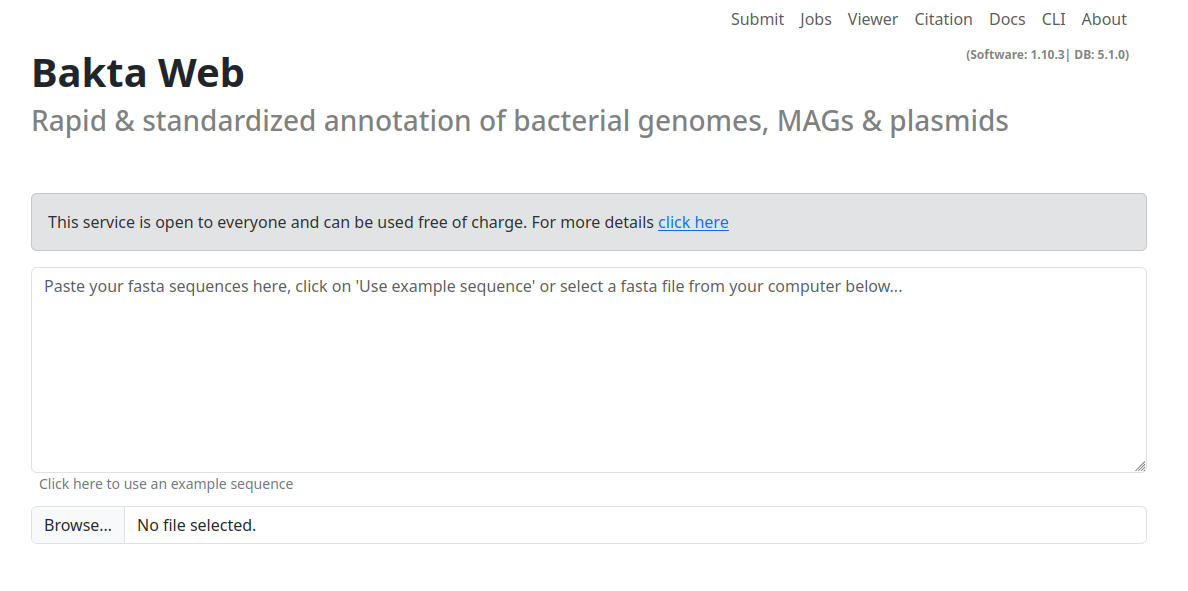
Submitting a job
To begin the annotation process, submit your nucleotide sequence in FASTA format. You can paste the sequence directly into the text input field or upload a FASTA file using the Browse button. All sequences MUST be nucleotide sequences.
The submit options contain three sections. Organism for specifying additional (optional) description tags for the submitted organism, Annotation for annotation processing settings and Replicons to provide additional optional sequence metadata, e.g. completeness and topology for each provided contig.
Organism

The Organism section contains descriptive fields for the organism being annotated. All fields are optional. The Genus and Species fields feature auto-completion, automatically querying a database of available organisms. The Strain field lets you specify a particular strain from the selected genus.
For sequence identification, Locus prefix and Locus tag prefix can be used to add prefixes to all sequences. This helps in organizing and identifying your sequences within the annotation results.
Annotation
The Annotation section contains options that directly alter the annotation process, these options are the following:
- Complete genome: Flag to indicate that the sequence belongs to a complete genome and not a fragment
- Keep contig headers: Keep the original contig headers for the replicon table.
- Min contig length: The minimal contig length to consider for annotation
- Translation table: Which translation table should be used to identify Features
- Mono-/Diderm: Is your organism Mono or Diderm (or unknown)
- Prodigal training file: You can provide your own prodigal training file to customize your annotation process.
Most of these options are associated to a specific Bakta CLI option. More information about these settings can be found here.
Replicons
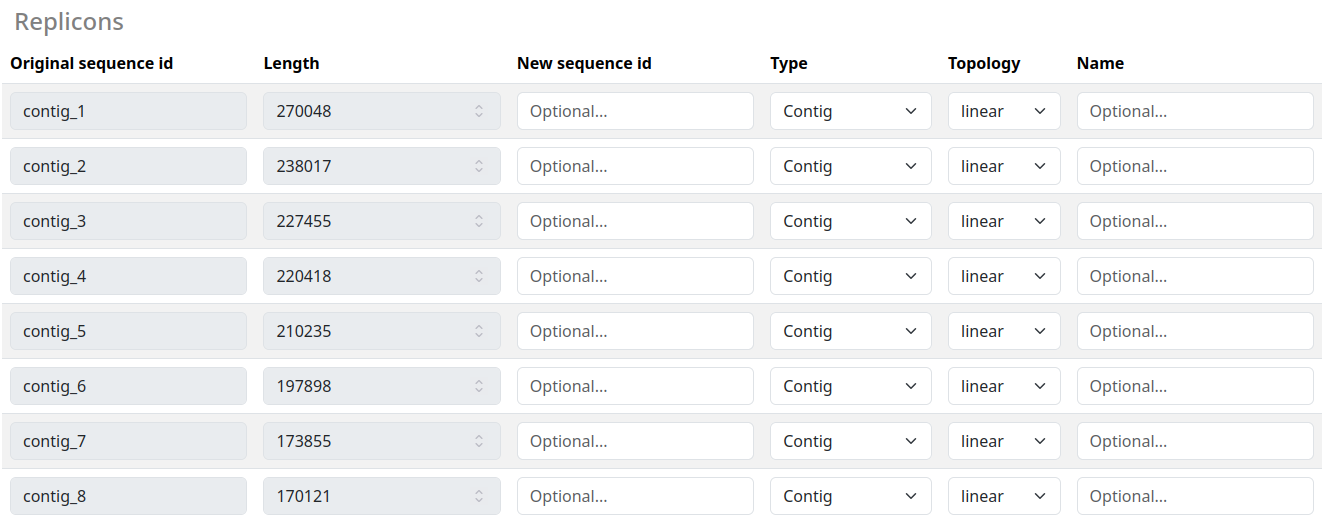
The Replicons Table displays all sequences and their associated metadata in a visual format. Here you can provide additional information about each sequence, including new identifiers and alternative names. Two critical settings in this section are Type and Topology:
- Type: Specify whether a sequence belongs to a chromosome or plasmid
- Topology: Indicate the sequence's topology
If you are uncertain about either the Type or Topology of a sequence, use ? to indicate unknown status. These settings help guide the annotation pipeline, but accuracy is more important than completeness - it's better to mark something as unknown than to provide incorrect information.
Monitoring progress
All of your current and past jobs can be viewed in the Jobs tab.
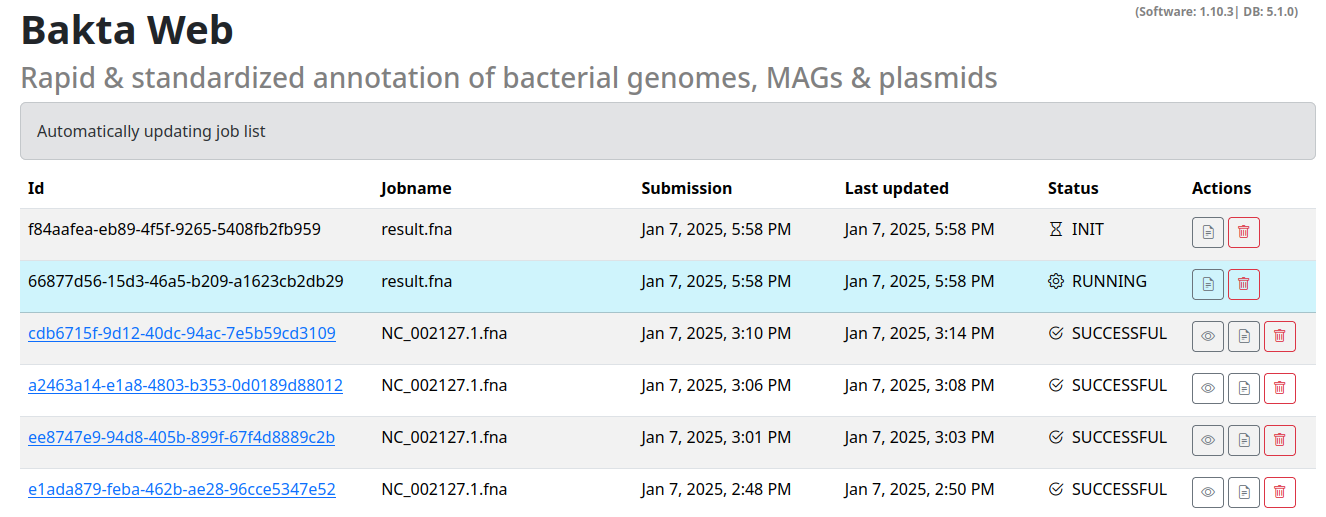
This list automatically updated jobs that have not yet finished.
The list contains the following options:
- Id: The job UUID this can be used to uniquely identify your job.
- Jobname: A human readable name for your sequence / job. Based on your filename or
Manually_entered_sequence_s/Manually_entered_sequencefor manually entered sequences - Submission: Timestamp of submission
- Last updated: When did this job receive the last update. Completed and failed jobs will not receive any updates.
- Status: The status of the job (INIT/RUNNING/SUCCESSFUL/ERROR).
- Actions: Actions for the specified jobs, view the stdout/stderr logs, permanently delete the job or view the results.
If the job was successful it will turn into a hyperlink to the result viewer section of this specific job.
Visualizing results
This page has two uses, you can either visualize a local json output from the Bakta CLI, or you can reach these page by clicking on your Successful Bakta Web results.
Local results
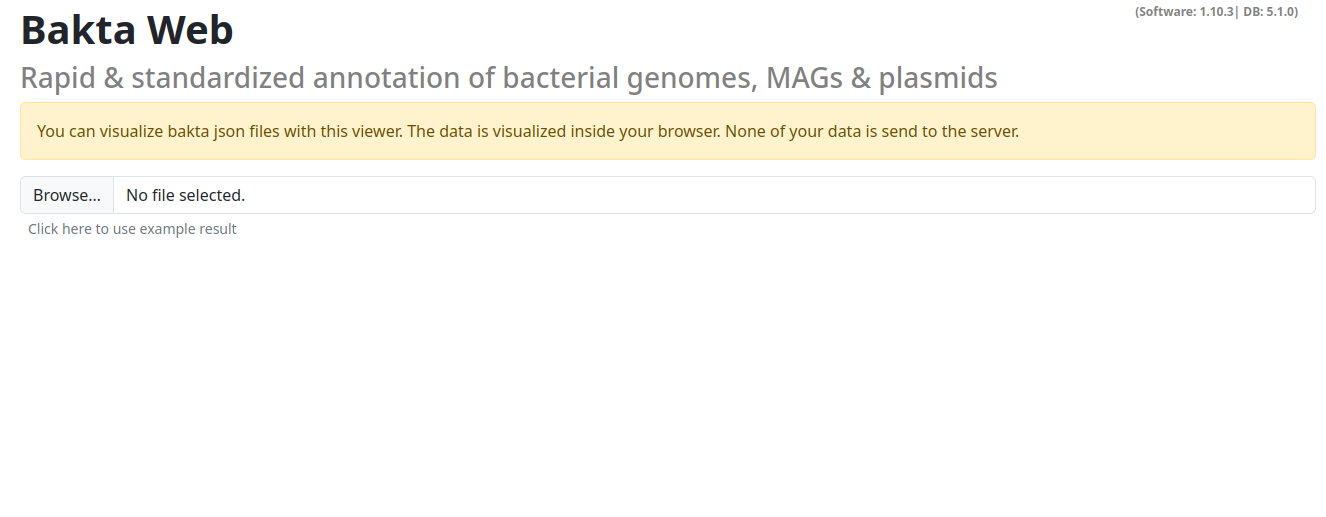
You can select a local json file here.
NOTE: This action does NOT upload any data, all visualizations are done in the browser on your local machine.
Results section
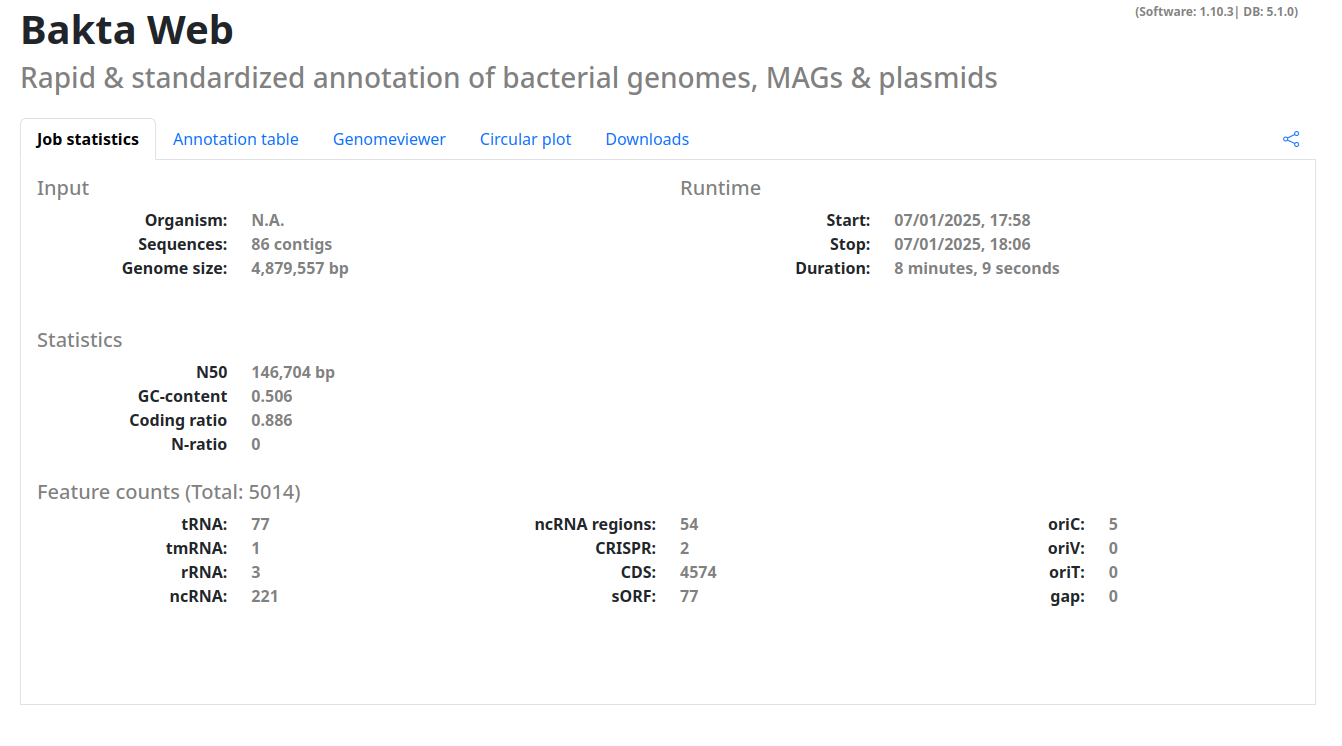
When you correctly specified a result to visualize you will by directed to a page with your results. This page is structured into multiple tabs with useful visualizations and information.
- Job statistics: Basic statistics of the job run (if available) and about your sequence, the number of annotated features etc.
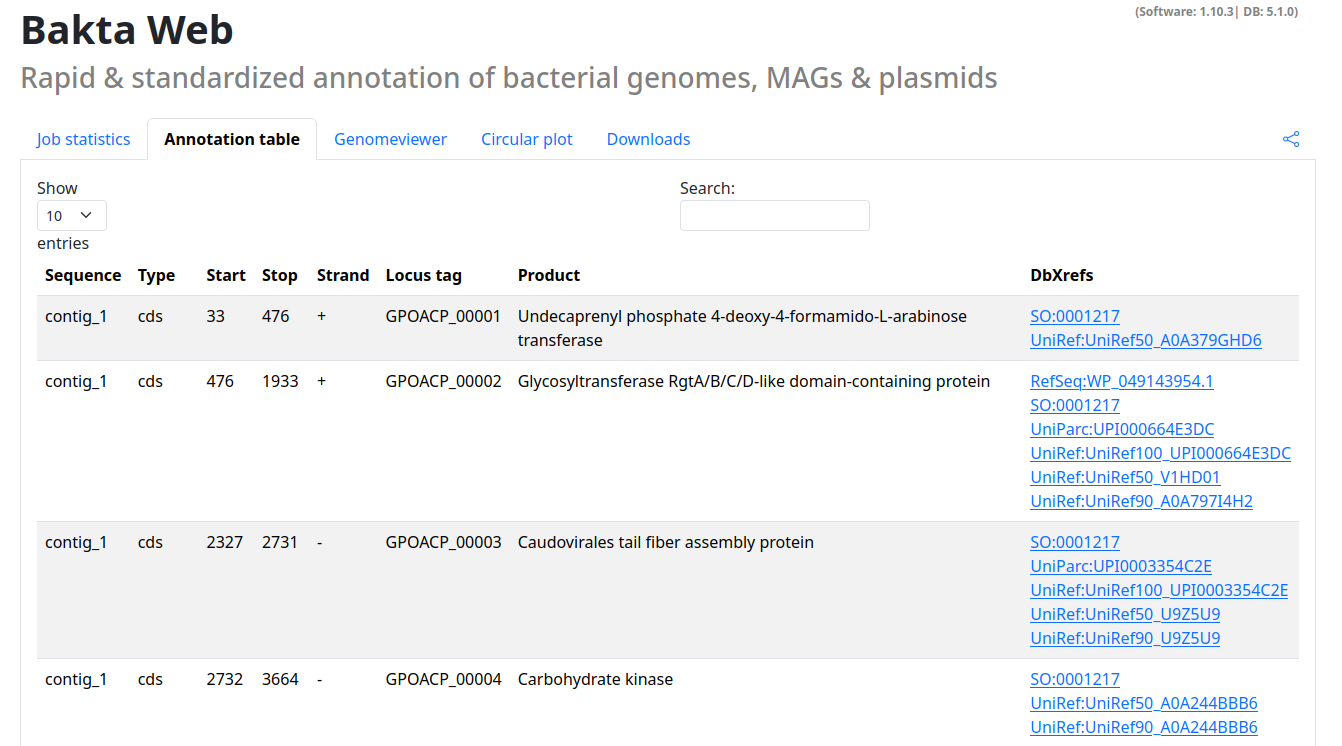
- Annotation table: A searchable table of all annotated features including cross-references to all available databases
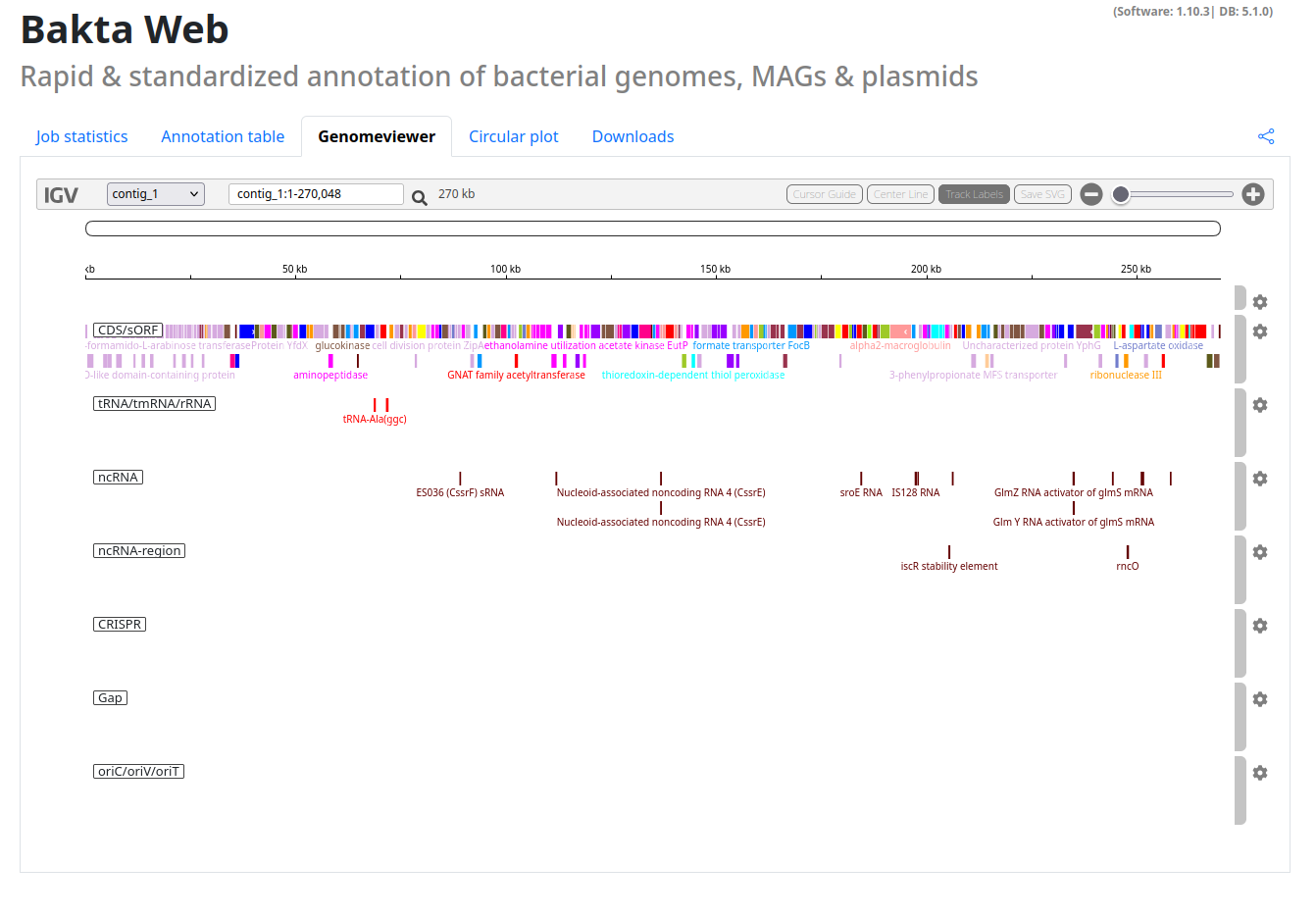
- Genomeviewer: An integrated IGV viewer to explore your annotated sequences.
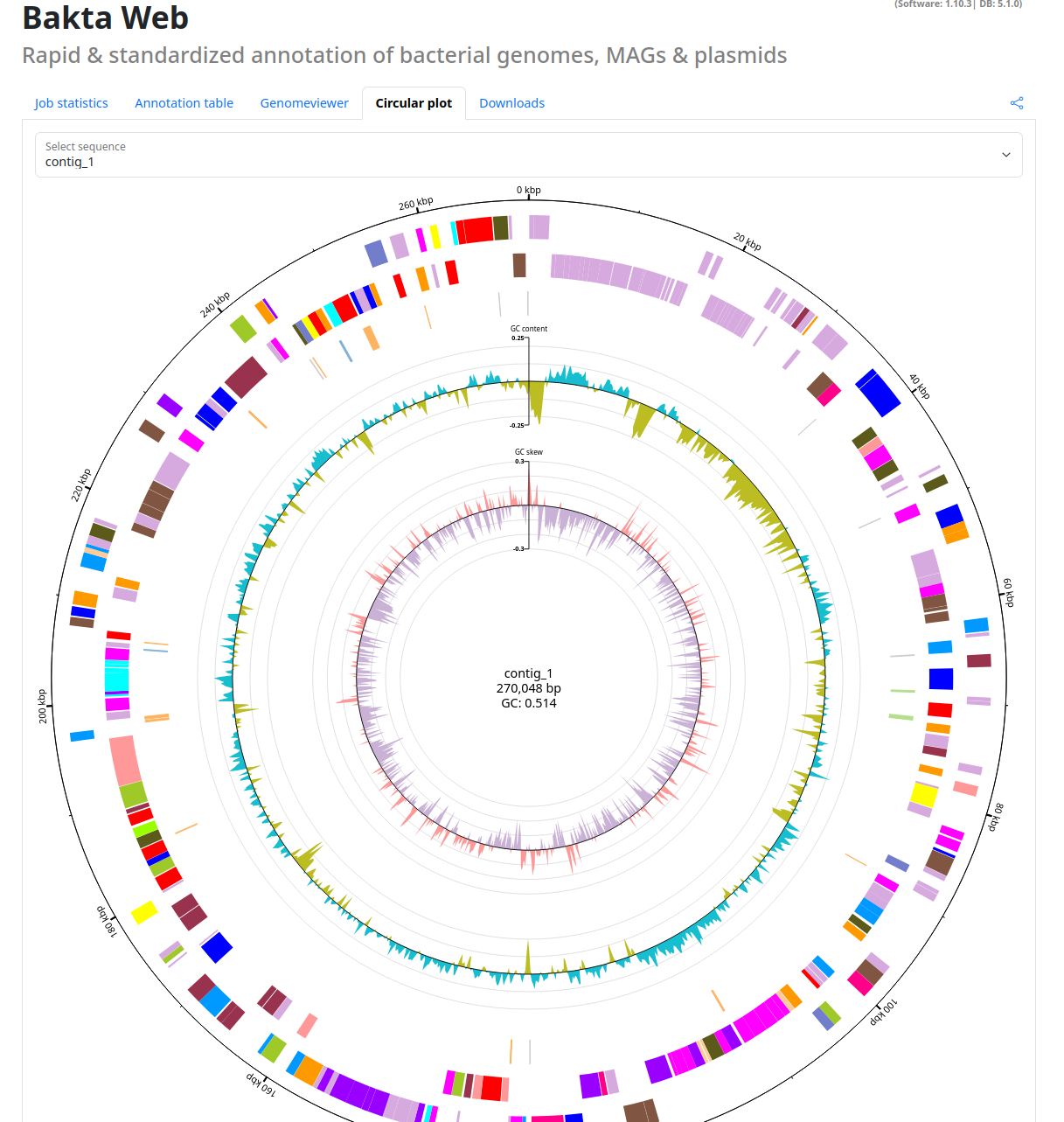
- Circular plot: An interactive circular plot of your annotated sequences.
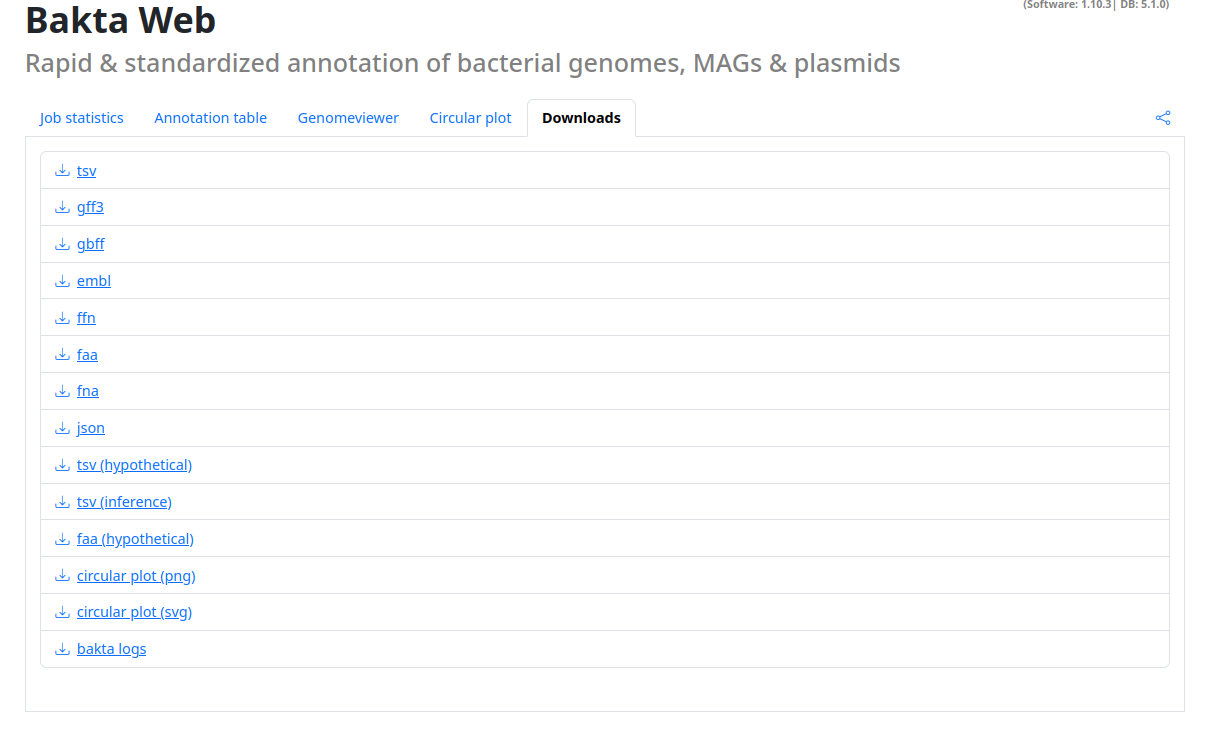
- Downloads: All Bakta output files as download for further processing.
Additionally this page contains a share button, with this you can share your annotation results to others.
NOTE: If you share the copied url you grant the recipient unrevokable access to this result.
Examples
Annotation table
Genomeviewer
Circular plot
Downloads
Bakta API
Bakta provides a open-access REST-API that can be used to annotate own genomes programmatically.
The API and the corresponding OpenAPI 3.1 documentation can be found here:
https://api.bakta.computational.bio
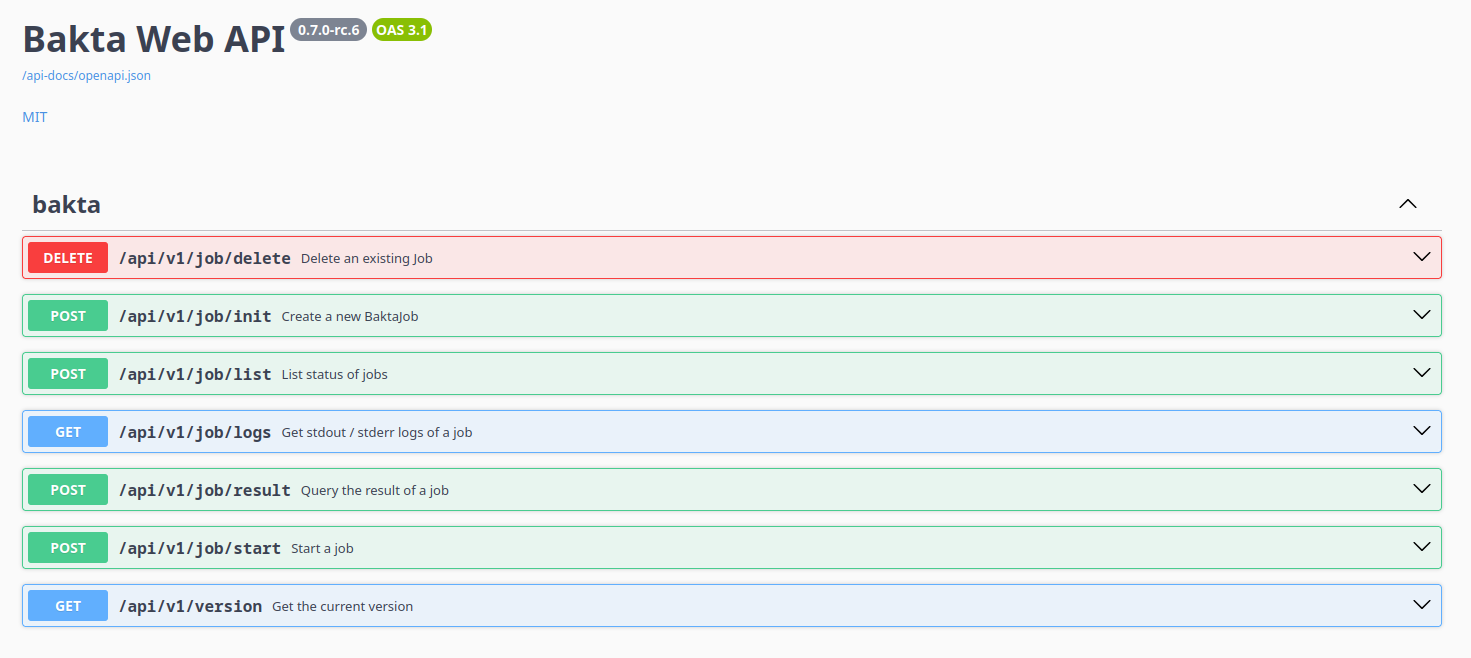
The API provides the following endpoints:
- Init Job - Initializes a new annotation job
- Start Job - Start a previously initialized job
- Delete Job - Deleting an existing job
Procedure
The overall procedure for jobs should look like this:
Init -> Put Data -> Start -> List (wait till job succeeeds) -> Query Results
Bugs and Issues
If you find any bugs, issues please report them here:
Bakta Web backend: https://github.com/ag-computational-bio/bakta-web-backend
Init Job
Initialize a new bakta annotation job.
Method: POST
Request Body:
{
  "name": "string",
  "repliconTableType": "CSV"
}
The body contains a user-defined name and the type of the replicon table (either TSV or CSV).
Response Body:
{
  "job": {
    "jobID": "3fa85f64-5717-4562-b3fc-2c963f66afa6",
    "secret": "string"
  },
  "uploadLinkFasta": "string",
  "uploadLinkProdigal": "string",
  "uploadLinkReplicons": "string"
}
The job section of the response contains a UUIDv4 (jobID) and a corresponding secret, this must be stored and provided by all subsequent requests that are associated to this job.
The response also contains three pre-authenticated S3 Urls:
uploadLinkFasta should be used to upload the (fasta) sequence data for annotation.
uploadLinkProdigal (optional) can be used to upload an additional prodigal training file
uploadLinkReplicons (optional) should be used to upload a replicon table in tsv format that describes the provided replicons in the fasta input file
By issuing a PUT request with the associated data as body you can upload the necessary data needed for the initialization.
NOTE: Previous API versions required the upload of all three files (FASTA, prodigal.tf and replicons.tsv) even if they were not used, this is no longer necessary as long these are not used in the subsequent start request.
Full Example (cURL)
Init request:
curl -X 'POST' \
  'https://api.bakta.computational.bio/api/v1/job/init' \
  -H 'accept: application/json' \
  -H 'Content-Type: application/json' \
  -d '{
  "name": "test",
  "repliconTableType": "TSV"
}'
Put sequence data (required):
curl -X 'PUT' \
  '<uploadLinkFasta>' \
  --data-binary "@path/to/file.fasta"
Put prodigal training file (optional):
curl -X 'PUT' \
  '<uploadLinkProdigal>' \
  --data-binary "@path/to/file.tf"
Put replicon table (optional):
curl -X 'PUT' \
  '<uploadLinkReplicons>' \
  --data-binary "@path/to/file.tsv"
Start Job
Start a job that has been initialized before. Please make sure that all files have been successfully uploaded before issuing this request.
Method: POST
Request Body:
{
  "config": {
    "completeGenome": true, // Complete genome
    "compliant": true, // INDSC compliant
    "dermType": null, // (optional) Either empty or one of "UNKNOWN", "MONODERM", "DIDERM"
    "genus": "string", // Genus name
    "hasReplicons": true, // If true a PUT to uploadLinkReplicons must have been issued beforehand
    "keepContigHeaders": true, // Keep the contig header names
    "locus": "string", // Add locus name
    "locusTag": "string", // Add locus tag
    "minContigLength": 9007199254740991, // Minimal contig length
    "plasmid": "string", // --plasmid option
    "prodigalTrainingFile": "string", // If any string is provided a PUT to uploadLinkProdigal must have been issued before
    "species": "string", // Species name
    "strain": "string", // Strain
    "translationTable": 4 // Either 4 or 11
  },
  "job": {
    "jobID": "3fa85f64-5717-4562-b3fc-2c963f66afa6",
    "secret": "string"
  }
}
For a more detailed description of all the config options please visit the corresponding CLI docs.
Response Body:
This request has no response body, a successfull request will be indicated by a 200 statuscode.
Full Example (cURL)
curl -X 'POST' \
  'https://api.bakta.computational.bio/api/v1/job/start' \
  -H 'accept: application/json' \
  -H 'Content-Type: application/json' \
  -d '{
  "config": {
    "completeGenome": true,
    "compliant": true,
    "dermType": null,
    "genus": "string",
    "hasReplicons": true,
    "keepContigHeaders": true,
    "locus": "string",
    "locusTag": "string",
    "minContigLength": 9007199254740991,
    "plasmid": "string",
    "prodigalTrainingFile": "string",
    "species": "string",
    "strain": "string",
    "translationTable": 1073741824
  },
  "job": {
    "jobID": "3fa85f64-5717-4562-b3fc-2c963f66afa6",
    "secret": "string"
  }
}'
List
List the status of all jobs provided.
Method: POST
Request Body:
{
  "jobs": [
    {
      "jobID": "3fa85f64-5717-4562-b3fc-2c963f66afa6",
      "secret": "secret-job-1"
    },
    {
      "jobID": "3fa85f64-5717-4562-b3fc-2c963f66afa6",
      "secret": "secret-job-2"
    }
  ]
}
The request contains a list for all jobs you want to have a status update (potentially all), including their secrets.
Response Body:
{
  "jobs": [
    {
      "jobID": "3fa85f64-5717-4562-b3fc-2c963f66afa6",
      "jobStatus": "SUCCESSFUL",
      "started": "2025-01-07T17:01:14Z",
      "updated": "2025-01-07T17:09:22Z",
      "name": "result_1_.fna"
    }
  ],
  "failedJobs": []
}
The response contains two sections: jobs a list with all jobs including the following fields:
- jobID: Job UUID
- jobStatus: Status of the job
- INIT: Job has not started yet, either not started or queued due to high demand
- RUNNING: Job is currently running
- SUCCESSFUL: Job has successfully annotated the sequence
- ERROR: Either malformed inputs/sequences or an internal server error, query logs for deeper information
- started: Started timestamp
- updated: Updated timestamp
- name: Provided name of the job
The failedJobs section contains jobs that could not be returned. This can have two reasons: A wrong secret UNAUTHORIZED or a wrong id / deleted job NOT_FOUND
Full Example (cURL)
curl -X 'POST' \
  'https://api.bakta.computational.bio/api/v1/job/list' \
  -H 'accept: application/json' \
  -H 'Content-Type: application/json' \
  -d '{
  "jobs": [
    {
      "jobID": "3fa85f64-5717-4562-b3fc-2c963f66afa6",
      "secret": "string"
    }
  ]
}'
Logs
Start a job that has been initialized before. Please make sure that all files have been successfully uploaded before issuing this request.
Method: GET
Request:
This Request has no body, but requires the user to provide a specific job via query parameters jobId and secret.
Response Body:
The response contains the stdout/stderr output of the specified job.
Example responses:
If an internal server occurs that is not associated with wrong or malformed user-input the following message will be returned:
Internal server error, please contact the administrator or try again later.
A regular Bakta stdout output, it will always start with a print of the issued command.
Bakta Command: bakta --tmp-dir /cache --threads 8 --prefix result -o /results --db /db/db --replicons /data/replicons.tsv --gram ? /data/fastadata.fasta --force
Parse genome sequences...
	imported: 86
	filtered & revised: 86
	contigs: 86

Start annotation...
predict tRNAs...
	found: 78
predict tmRNAs...
	found: 1
predict rRNAs...
	found: 3
predict ncRNAs...
	found: 221
predict ncRNA regions...
	found: 54
predict CRISPR arrays...
	found: 2
predict & annotate CDSs...
	predicted: 4586
	discarded spurious: 6
	revised translational exceptions: 3
	detected IPSs: 4412
	found PSCs: 137
	found PSCCs: 11
	lookup annotations...
	conduct expert systems...
		amrfinder: 16
		protein sequences: 690
	combine annotations and mark hypotheticals...
	detect pseudogenes...
		candidates: 26
		verified: 15
	analyze hypothetical proteins: 72
		detected Pfam hits: 1
		calculated proteins statistics
	revise special cases...
detect & annotate sORF...
	detected: 59639
	discarded due to overlaps: 47954
	discarded spurious: 9
	detected IPSs: 92
	found PSCs: 11
	lookup annotations...
	filter and combine annotations...
	filtered sORFs: 88
detect gaps...
	found: 0
detect oriCs/oriVs...
	found: 5
detect oriTs...
	found: 0
apply feature overlap filters...
select features and create locus tags...
	selected: 5014
improve annotations...
	revised gene symbols: 43

Genome statistics:
	Genome size: 4,879,557 bp
	Contigs/replicons: 86
	GC: 50.6 %
	N50: 146,704
	N90: 32,820
	N ratio: 0.0 %
	coding density: 88.6 %

annotation summary:
	tRNAs: 77
	tmRNAs: 1
	rRNAs: 3
	ncRNAs: 221
	ncRNA regions: 54
	CRISPR arrays: 2
	CDSs: 4574
		hypotheticals: 70
		pseudogenes: 15
	sORFs: 77
	gaps: 0
	oriCs/oriVs: 5
	oriTs: 0

Export annotation results to: /results
	human readable TSV...
	GFF3...
	INSDC GenBank & EMBL...
	genome sequences...
	feature nucleotide sequences...
	translated CDS sequences...
	feature inferences...
	circular genome plot...
	hypothetical TSV...
	translated hypothetical CDS sequences...
	machine readable JSON...
	Genome and annotation summary...

If you use these results please cite Bakta: https://doi.org/10.1099/mgen.0.000685
Annotation successfully finished in 7:26 [mm:ss].
Full Example (cURL)
curl -X 'POST' \
  'https://api.bakta.computational.bio/api/v1/job/start' \
  -H 'accept: application/json' \
  -H 'Content-Type: application/json' \
  -d '{
  "config": {
    "completeGenome": true,
    "compliant": true,
    "dermType": null,
    "genus": "string",
    "hasReplicons": true,
    "keepContigHeaders": true,
    "locus": "string",
    "locusTag": "string",
    "minContigLength": 9007199254740991,
    "plasmid": "string",
    "prodigalTrainingFile": "string",
    "species": "string",
    "strain": "string",
    "translationTable": 1073741824
  },
  "job": {
    "jobID": "3fa85f64-5717-4562-b3fc-2c963f66afa6",
    "secret": "string"
  }
}'
Result
The request to retrieve the results of an annotation workflow.
Method: POST
Request Body:
{
  "jobID": "3fa85f64-5717-4562-b3fc-2c963f66afa6",
  "secret": "string"
}
Response Body:
{
  "ResultFiles": {
    "EMBL": "string",
    "FAA": "string",
    "FAAHypothetical": "string",
    "FFN": "string",
    "FNA": "string",
    "GBFF": "string",
    "GFF3": "string",
    "JSON": "string",
    "PNGCircularPlot": "string",
    "SVGCircularPlot": "string",
    "TSV": "string",
    "TSVHypothetical": "string",
    "TSVInference": "string",
    "TXTLogs": "string"
  },
  "jobID": "3fa85f64-5717-4562-b3fc-2c963f66afa6",
  "name": "string",
  "started": "2025-01-07T20:12:26.387Z",
  "updated": "2025-01-07T20:12:26.387Z"
}
The results response contains the usual job metadata (jobID, name, started and updated), as well as a ResultsFiles section, this section contains pre-authenticated URLs that can be used to retrieve the results of the job with a simple GET request.
Full Example (cURL)
curl -X 'POST' \
  'https://api.bakta.computational.bio/api/v1/job/result' \
  -H 'accept: application/json' \
  -H 'Content-Type: application/json' \
  -d '{
  "jobID": "3fa85f64-5717-4562-b3fc-2c963f66afa6",
  "secret": "string"
}'
Retrieve a result from ResultFiles:
curl '<ResultFilesUrl>'
Delete Job
Delete a job including all of its data.
NOTE: This is a destructive action that cannot be undone.
Method: DELETE
Request:
This Request has no body, but requires the user to provide a specific job via query parameters jobId and secret.
Response Body:
This request has no response body, a successfull request will be indicated by a 200 statuscode.
Full Example (cURL)
curl -X 'DELETE' \
  'https://api.staging.bakta.computational.bio/api/v1/job/delete?secret=test&jobID=957f4923-0b18-413d-b705-51b54015864d'
Version
Retrieve the versions of all backend components, including the Bakta CLI, Database and backend.
Method: GET
Request:
This Request has no body.
Response Body:
{
  "toolVersion": "1.10.3",
  "dbVersion": "5.1.0",
  "backendVersion": "0.6.4"
}
Versions of the bakta tool toolVersion, the bakta database dbVersion and the backend backendVersion.
Full Example (cURL)
curl -X 'GET' \
  'https://api.staging.bakta.computational.bio/api/v1/version' \
  -H 'accept: application/json'